Replace PuTTY + WinSCP with one workspace
Short answer: if your daily hop is PuTTY for the shell and WinSCP for the files, a free AidaIDE workspace on Windows replaces that pair — SSH and SFTP share one login, plus a vault and LCOT. Keep PuTTY when you need a portable ~1 MB binary. Keep WinSCP when you need FTP, S3, WebDAV, or its scripting/.NET jobs. Head-to-heads: vs PuTTY · vs WinSCP.
Most people who search “PuTTY WinSCP replacement” are not angry at either program. They are tired of logging in twice to change one line in nginx.conf. This page is about that hop — not a claim that AidaIDE is a better portable terminal or a better FTP/S3 engine.
The six-tool stack you are actually replacing
The “PuTTY + WinSCP” search is usually a stand-in for six windows:
| Tool | Job in the hop | After a workspace |
|---|---|---|
| PuTTY | SSH shell, one window per host | Tabbed terminal on the same session as files |
| WinSCP | SFTP browse / transfer, second login | Dual-pane SFTP attached to that session |
| Local editor | Download, edit, wait for re-upload | Edit in place; save writes to the server |
| Browser / notes | Re-google systemctl restart and df -h | LCOT — 800+ one-click commands |
| Password file | Sticky note, KeePass paste, or remembered string | AES-256 vault, one unlock per session |
| Pageant / extra app | Keys in one place, serial in another | Keys in the vault; serial in the same desktop |
You do not have to throw the stack away. AidaIDE sits beside PuTTY and WinSCP. Import sessions, try the one-window loop, keep the specialists for the jobs they still win.
When to keep PuTTY or WinSCP
Keep PuTTY for a portable ~1 MB binary, locked-down machines, or rare one-off SSH. Keep WinSCP for FTP/FTPS/WebDAV/S3, scripting/.NET jobs, and directory sync. The full lists live on PuTTY alternatives and WinSCP alternatives — this page is only the combined hop.
What “one workspace” actually means
One saved host. One vault unlock. Then three things share that login:
- SSH terminal — tabbed, 10k scrollback, jump-host aware.
- SFTP file browser — dual pane on the same session. No second password prompt.
- LCOT — Local Chain of Thought: 800+ one-click commands, plus linked navigation so the browser and
cdstay on the same host. See What is LCOT?
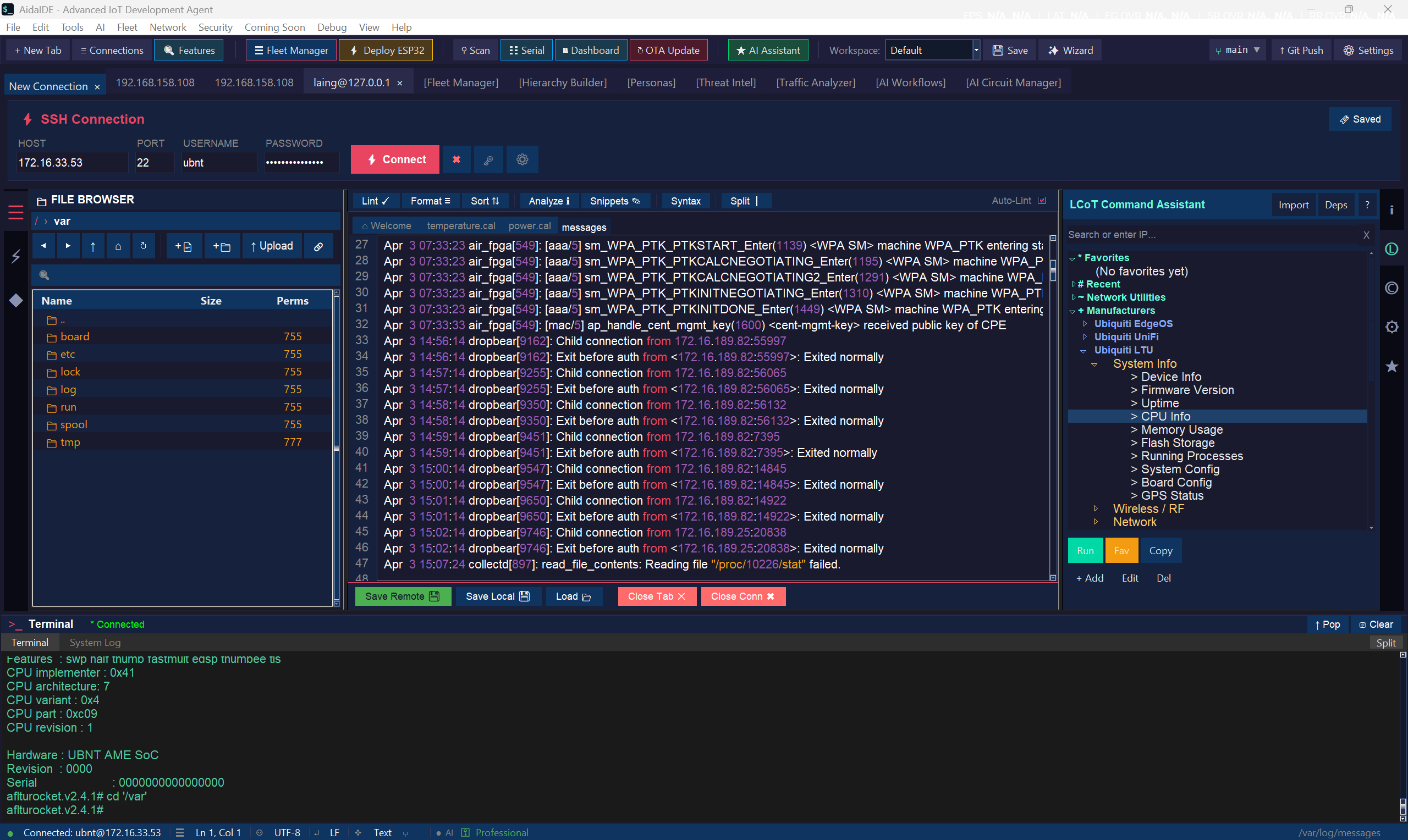
Feature table: the hop vs one window
| Capability | PuTTY + WinSCP + notes | AidaIDE (Free) |
|---|---|---|
| SSH terminal | Yes — separate window | Yes — tabbed, same session as files |
| SFTP browse / transfer | Yes — second login | Yes — dual pane, same login |
| Edit remote files | Temp copy + re-upload | In place — save writes to the server |
| Encrypted credential vault | WinSCP optional; PuTTY never stores passwords | AES-256, one unlock |
| One-click command library | That’s the Google tab | LCOT — 800+ phrases |
| FTP / S3 / WebDAV | WinSCP | No — keep WinSCP |
| Portable ~1 MB binary | PuTTY | Full desktop app — keep PuTTY |
| Host OS | Windows (both) | Windows today; macOS & Linux in progress |
| Price | Free | Free forever (signup to download) |
The edit / save / restart workflow
The hop
- Open WinSCP, log in, find the config, download or open the temp copy.
- Edit locally. WinSCP re-uploads.
- Open PuTTY, log in again, restart the service, tail the log.
One workspace
- Unlock the vault, click the saved host.
- Open the file in the linked pane, edit, save — it is on the server.
- Restart and tail in the linked terminal, or click the LCOT phrases.
Hands-on: edit remote files · keep terminal and browser in sync.
When not to switch
- You live in PuTTY portable and will not install a desktop app.
- FTP/S3/scripting is the job — WinSCP stays the specialist.
- You need a shipping macOS or Linux client today. AidaIDE is Windows now; other hosts are in progress.
- Open source is a hard requirement. PuTTY is MIT; AidaIDE is closed source.
Bring sessions over
- Create a free account and download the Windows build.
- Import PuTTY sessions from the registry on first launch — hosts, ports, key paths.
- Put passwords and keys in the vault. Unlock once per session.
- Run one real change: edit, save, restart, tail. If the hop still wins for a host, keep PuTTY or WinSCP for that host.
Frequently asked
Can AidaIDE replace both PuTTY and WinSCP?
For daily SSH admin on Windows — yes. Keep PuTTY for portable ~1 MB. Keep WinSCP for FTP, S3, WebDAV, and scripting. Wider field: PuTTY alternatives · WinSCP alternatives · SSH clients with SFTP.
Is the replacement free?
The workspace, vault, and LCOT library are free forever. Create a free account to download. Pro is $19/mo or $190/yr; Teams Pro is $70/mo or $700/yr for 5 seats. See pricing.
Does it run on Mac or Linux?
Windows today. macOS and Linux builds are in progress.
What is LCOT?
Local Chain of Thought — 800+ one-click commands and linked terminal/SFTP on the same login. Glossary: /guides/lcot. Docs: /docs/lcot.
Sign up free — download for Windows
Free forever · no license key · Windows today (macOS & Linux in progress)
Sign Up Free — Download