SSH client with SFTP: pick by the job
Short answer by job: need a transfer GUI (FTP/S3 too)? WinSCP on Windows, FileZilla or Cyberduck if you need Mac/Linux or buckets. Need a shell and files on one Windows session? AidaIDE (free) or MobaXterm (X11). Need the same hosts on your phone? Termius. AidaIDE ships for Windows today; macOS and Linux are in progress — we do not pretend otherwise.
“SSH client with SFTP” is three different products wearing one query. A transfer client that can open a terminal is not the same as a terminal that can browse files, and neither is a mobile sync app. The table below is honest about OS — FileZilla really is cross-platform; AidaIDE is not, yet.
Comparison
| Tool | Host OS | SFTP + SSH together? | Best for | Watch-out |
|---|---|---|---|---|
| WinSCP | Windows | SFTP yes; SSH via PuTTY (second login) | Protocols, sync, scripting | Not one session with the shell |
| FileZilla | Win / Mac / Linux | SFTP/FTP client — not an SSH workspace | Like-for-like transfers anywhere | No tabbed SSH, no vault-as-IDE |
| Cyberduck | Win / Mac | SFTP + cloud storage | S3 / Azure / GCS next to servers | Not a daily SSH terminal |
| MobaXterm | Windows | SFTP pane on the SSH session | X11 + Unix toolbox on Windows | Free edition caps sessions / tunnels |
| Termius | Win / Mac / Linux / mobile | SSH first; SFTP behind paid tiers | Phone + desktop host sync | SFTP and team features sit on paid tiers |
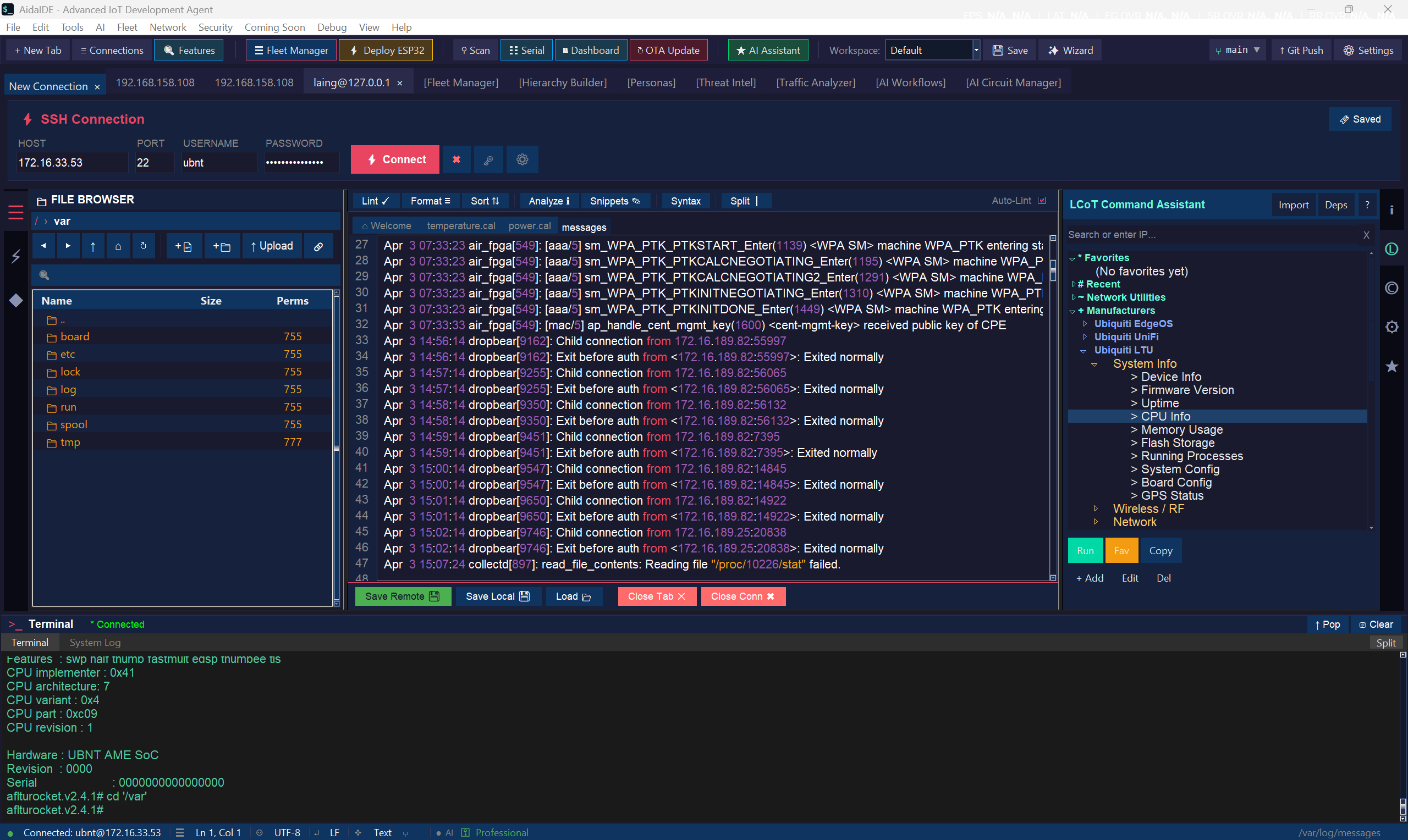
| AidaIDE | Windows today; Mac / Linux in progress | Same session, dual pane, edit in place | Desk/fleet SSH admin, vault, LCOT | Not portable; not FTP/S3 |
OS honesty: “cross-platform” applies to FileZilla and Termius. Cyberduck is Win/Mac. WinSCP and MobaXterm are Windows-focused. AidaIDE is Windows today — no shipping checkmark for Mac or Linux until those builds exist.
Where to go next
WinSCP — the transfer specialist
Right answer for FTP/FTPS/S3/WebDAV and scripted jobs. It can launch PuTTY; that is a second login. Head-to-head: AidaIDE vs WinSCP. Field guide: WinSCP alternatives.
MobaXterm — Windows toolbox + X11
SFTP beside the session, plus the X server AidaIDE does not ship. Free Home caps sessions and tunnels. Comparison: vs MobaXterm.
Termius — mobile sync first
Pick this if the phone is a real workflow. SFTP and team features sit on the subscription. AidaIDE is desktop-first (Windows today). Comparison: vs Termius.
AidaIDE — one session on Windows
Tabbed SSH, dual-pane SFTP, edit in place, AES-256 vault, and LCOT (Local Chain of Thought — 800+ one-click commands). Free forever; signup to download. Pro $19/mo or $190/yr; Teams Pro $70/mo or $700/yr for 5 seats. Not a portable 1 MB binary. Not FTP/S3.
Pick guide
- Edit config → restart → tail, on Windows: AidaIDE. See replace PuTTY + WinSCP.
- FTP / S3 / sync / scripts: WinSCP. Cloud and Mac/Linux transfer clients: WinSCP alternatives.
- Need X11: MobaXterm.
- Need Mac or Linux today: FileZilla or Termius — not AidaIDE yet.
- Need the phone: Termius.
Frequently asked
What is the best SSH client with a built-in SFTP browser?
On Windows: AidaIDE for one free session, MobaXterm if you need X11, WinSCP if transfers are the job. FileZilla and Cyberduck win on protocol/OS coverage, not as SSH IDEs.
Which tools run on Mac and Linux?
FileZilla and Termius on all three. Cyberduck on Win/Mac. AidaIDE: Windows today; macOS and Linux in progress.
Is there a free SSH client with SFTP?
WinSCP, FileZilla (SFTP), and AidaIDE (signup to download). MobaXterm Home caps sessions and tunnels; Termius puts SFTP and team features on paid tiers.
Can I keep WinSCP and add a workspace?
Yes. That is the intended migration: workspace for SSH daily work, WinSCP for the protocols and jobs it still owns.
One session for shell and files
Free forever · signup to download · Windows today (macOS & Linux in progress)
Sign Up Free — Download