The best PuTTY alternatives for Windows in 2026
Short answer: if you want PuTTY but better, use KiTTY (a drop-in fork) or SuperPuTTY (adds tabs). If you want one window instead of a pile of tools, use AidaIDE (free, SSH + SFTP + editor + vault) or MobaXterm (free tier, X11 forwarding). If you mostly work in Linux locally, use Windows Terminal + WSL. Plain PuTTY still wins when you need a portable ~1 MB binary.
PuTTY is 27 years old, weighs about a megabyte, and still works. That longevity is the reason it's hard to replace — and the reason most "alternatives" lists are useless, because they rank tools by feature count instead of by what you're actually trying to do. Below: seven real options, what each one is genuinely best at, and the cases where you should just keep PuTTY.
The seven alternatives, compared
| Tool | Price | Best for | Main limitation |
|---|---|---|---|
| KiTTY | Free | A drop-in PuTTY fork — same UI, plus session filtering, auto-login, and portability | Windows only; still one window per session |
| SuperPuTTY | Free | Wrapping PuTTY in a tabbed window without changing the engine | A front-end, not a client — inherits every PuTTY limitation |
| Solar-PuTTY | Free tier / paid | Saved sessions with credentials and a tabbed UI, from SolarWinds | Free tier is limited; Windows only |
| MobaXterm | Free tier / $69+ per user | X11 forwarding and a bundled Unix toolchain on Windows | Free edition caps sessions and tunnels; interface is dense |
| Termius | Free tier / subscription | Cross-device sync across desktop and mobile | Most useful features — SFTP, sync, teams — sit behind the subscription |
| Windows Terminal + WSL | Free | Living in a real Linux shell locally, with tabs and OpenSSH | No session manager, no GUI file transfer, no credential vault |
| AidaIDE | Free forever | SSH, SFTP, remote editing, and an encrypted vault in a single window | A full desktop app — not a portable binary |
How to choose in one line: pick a PuTTY fork if the problem is PuTTY's rough edges; pick a workspace if the problem is that PuTTY is only one of the four apps you have open.
If you want PuTTY, only better: KiTTY, SuperPuTTY, Solar-PuTTY
KiTTY is the most conservative choice on this list — a maintained fork that keeps PuTTY's interface and adds the things power users bolt on anyway: session filtering, automatic login scripts, portable mode, and per-session background colours so you don't fat-finger production. If your complaint is "PuTTY is fine but fiddly," this is the smallest possible move.
SuperPuTTY solves exactly one problem: it puts PuTTY sessions in tabs. It launches real PuTTY processes inside a tabbed shell, so everything PuTTY can't do — store passwords safely, browse files, edit remotely — it still can't do. Useful, narrow.
Solar-PuTTY goes further, adding saved sessions with credentials and a modern tabbed UI. It's Windows-only, and the free tier is limited enough that teams usually end up on the paid one.
If the real problem is having four apps open
Most people searching for a PuTTY alternative aren't unhappy with PuTTY's terminal. They're unhappy that a single task — edit a config, restart a service, watch the logs — takes PuTTY plus WinSCP plus a browser tab plus a note with a password on it. That's a different category of tool.
MobaXterm is the veteran here: X11 forwarding, a bundled Unix toolchain, SFTP, and serial in one Windows app. The free edition caps saved sessions and tunnels, and the interface carries a lot of history.
Termius optimises for a different axis — the same hosts on your laptop and your phone, synced. If you genuinely need mobile access, nothing else on this list competes. If you don't, you're paying a subscription for sync you won't use.
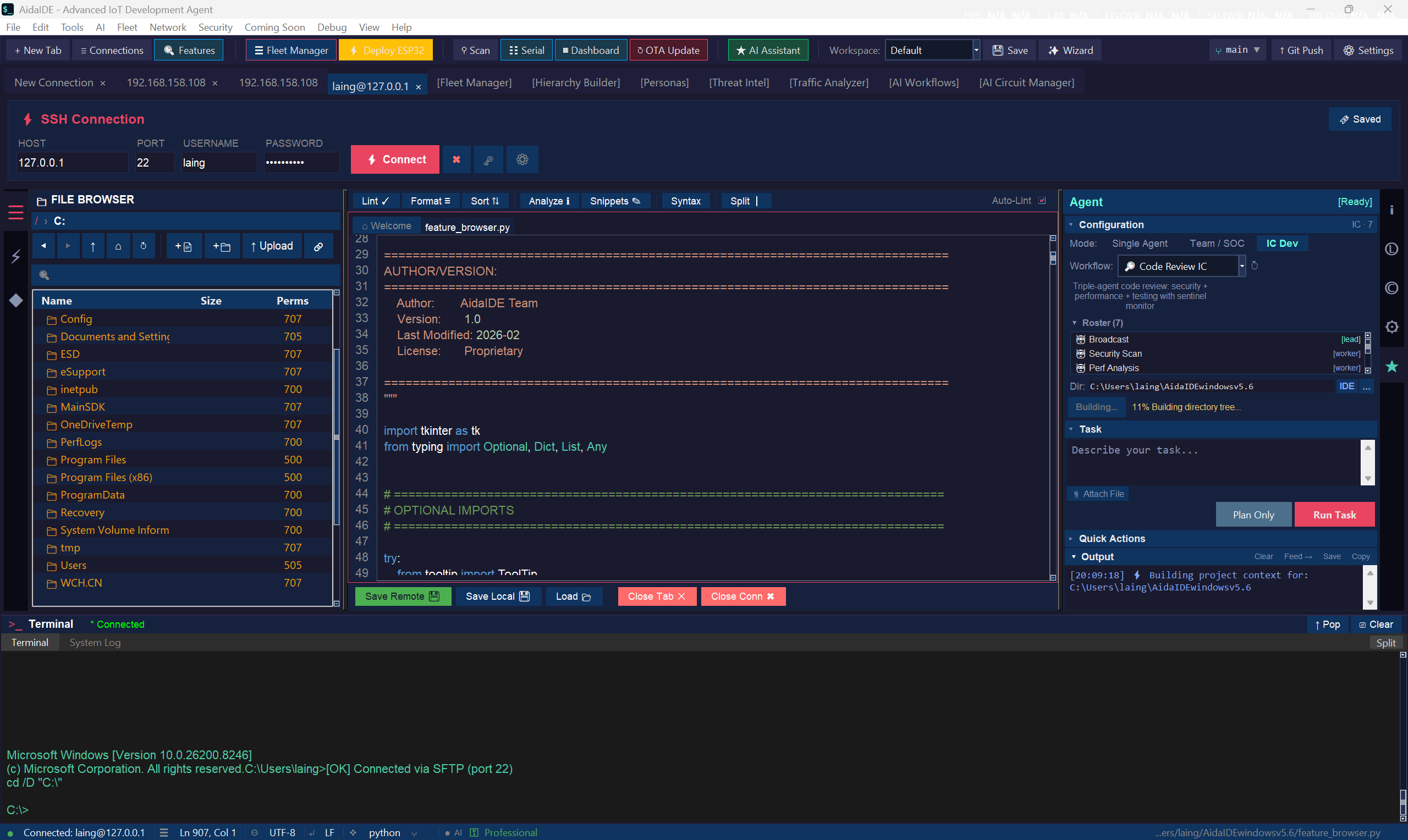
AidaIDE — ours, so weigh accordingly — puts the terminal, a dual-pane SFTP browser on that same session, an editor that saves straight back to the server, and an AES-256 credential vault in one window, free forever with no licence key. The rest of this page is the detail on that; for a straight head-to-head, see AidaIDE vs PuTTY. Replacing the whole hop (PuTTY plus WinSCP)? See replace PuTTY + WinSCP.
The one nobody lists: Windows Terminal + WSL
If your work is mostly local Linux with occasional SSH, the answer may not be a client at all. Windows Terminal gives you tabs, panes, and a proper modern console; WSL gives you OpenSSH, scp, and ~/.ssh/config. It costs nothing and it's already on your machine. What you don't get is a session manager, a GUI for file transfer, or anywhere safe to keep credentials — you're back to ssh-agent and shell history.
How AidaIDE compares with PuTTY specifically
| Capability | PuTTY | PuTTY + WinSCP + notes | AidaIDE (Free) |
|---|---|---|---|
| SSH terminal | Yes | Yes | Yes — tabbed, 10k scrollback |
| Tabs / multiple sessions in one window | No (one window per host) | No | Yes |
| SFTP file browsing + transfer | psftp (command line) | Yes (separate app + login) | Yes — same session, dual pane |
| Edit remote files in place | No | Download → edit → re-upload | Yes — open, edit, save to server |
| Encrypted credential vault | No (Pageant for keys only) | WinSCP stores, weakly by default | AES-256 vault, one unlock |
| Command library | No | No (that's the Google tab) | LCOT — 800+ one-click commands + linked terminal/SFTP on one SSH login |
| Jump hosts / legacy device fallback | Manual config | Manual | Built in |
| Serial console | Yes | Yes | Yes, with live plotter |
| Portable single ~1 MB binary | Yes | No | No — it's a full desktop app |
| Price | Free | Free | Free forever (no license key) |
The honest version: PuTTY wins on weight and portability. AidaIDE wins the moment your work spans more than one host, more than one window, or more than one command you keep re-googling.
What "one workspace" actually changes
Your credentials stop living on sticky notes
Hosts go into an AES-256 encrypted vault once — address, user, key or password. One vault unlock per session, then every connection is a click. PuTTY never solved this; it wasn't its job.
The Google tab becomes a button panel
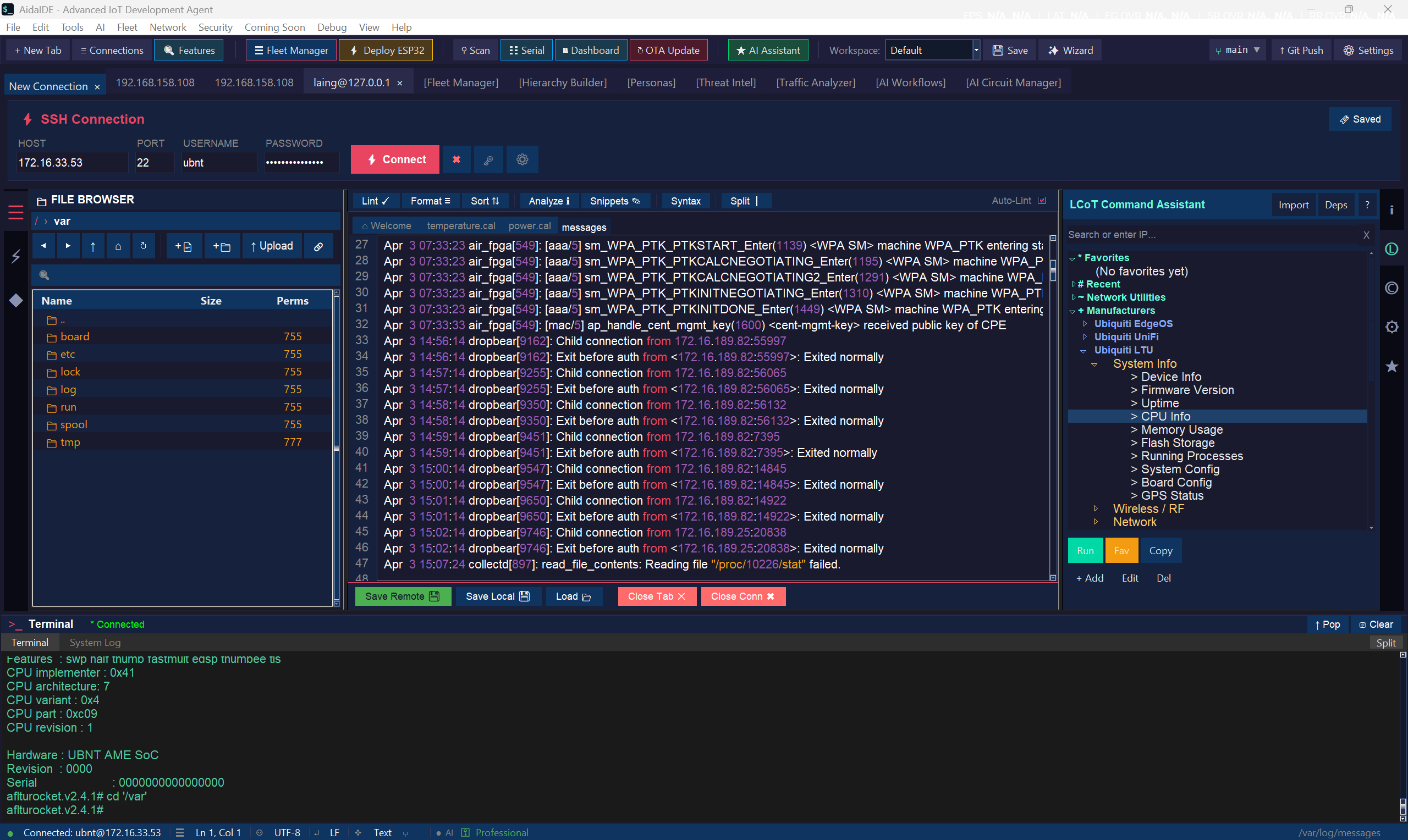
LCOT = Local Chain of Thought — 800+ one-click commands + linked terminal/SFTP on one SSH login. See What is LCOT?
Files and shell share one context
The file browser is attached to the same host session as your terminal. Open a config, edit with syntax highlighting, save — it's on the server. No second app, no second login, no download folder full of nginx.conf(3).bak.
When you should stick with PuTTY
- You need a portable client on a USB stick or a locked-down machine — PuTTY's single binary is unbeatable there.
- You SSH somewhere once a month. Installing a workspace for that is overkill.
- You're on a system where installing software needs a change request and three approvals — keep PuTTY, bookmark us for later.
Everyone else — the people with five terminals open right now — is who AidaIDE was built for.
Frequently asked
What is the best free alternative to PuTTY?
For most Windows users it's KiTTY if you want PuTTY's exact workflow with the rough edges filed off, and AidaIDE if you want SSH, SFTP, remote file editing, and stored credentials in one window. Both are free. MobaXterm and Termius have free tiers, but each caps meaningful features until you pay.
Is there a PuTTY alternative with tabs?
Several. SuperPuTTY wraps real PuTTY sessions in a tabbed window without changing the engine. Solar-PuTTY, MobaXterm, Termius, and AidaIDE are all natively tabbed. Windows Terminal gives you tabs for local shells and OpenSSH, but has no session manager.
Which PuTTY alternative can save passwords?
PuTTY itself never stored passwords — Pageant handles keys only. Solar-PuTTY, Termius, and MobaXterm store credentials; AidaIDE keeps them in an AES-256 encrypted vault that unlocks once per session. If you're storing credentials anywhere, check how the tool encrypts them at rest before you trust it with production hosts.
Is there a PuTTY alternative for Mac and Linux?
PuTTY has ports, but they're rarely the right answer. On macOS and Linux the built-in OpenSSH client plus a good terminal covers most of it; Termius runs natively on those platforms. AidaIDE ships for Windows today, with macOS and Linux builds in progress.
When should I just keep using PuTTY?
When you need a portable ~1 MB binary on a USB stick or a locked-down machine, when installing software requires a change request, or when you SSH somewhere once a month. PuTTY is still excellent at being small and everywhere.
Try the workspace your terminals deserve
Free forever · no license key · Windows (macOS & Linux in progress)
Sign Up Free — DownloadAlso replacing WinSCP? Read the WinSCP comparison · Replacing both? One workspace instead of the hop · What is LCOT? · New to remote work? SSH into a Raspberry Pi from Windows