What is LCOT?
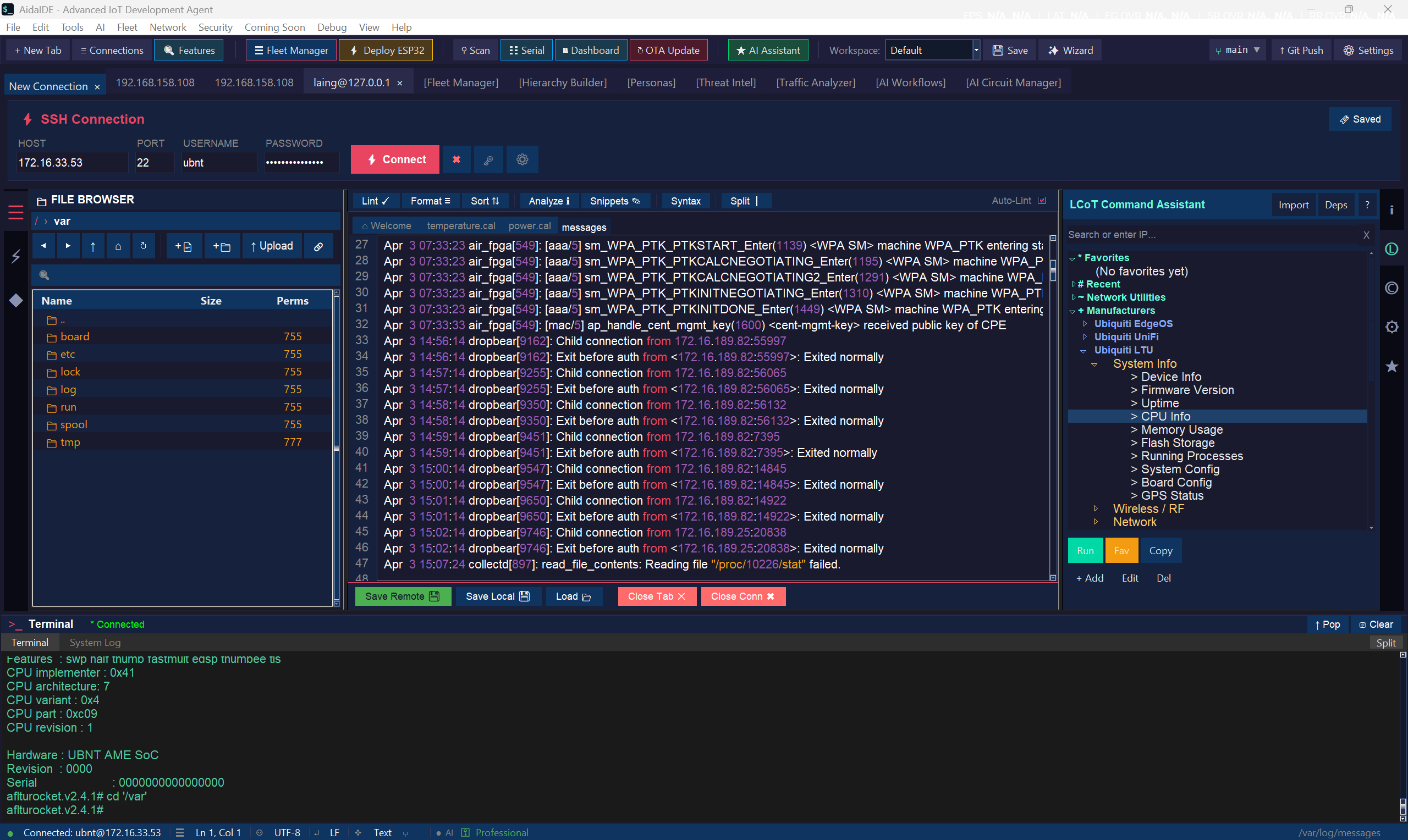
LCOT means Local Chain of Thought. In AidaIDE it is two things that share one SSH login: a library of 800+ one-click commands next to the live terminal, and linked terminal + SFTP panes so cd, edit, and restart stay on the same host.
If you have been bouncing between PuTTY and WinSCP, LCOT is the product word for “stop logging in twice.” The official chapter is /docs/lcot. The ten-minute HowTo is keep terminal and file browser in sync.
What it is
| Fact | |
|---|---|
| Expands to | Local Chain of Thought |
| Where it lives | Right side of a connection tab — View → Toggle LCOT Panel if hidden |
| Price | The panel and 800+ library ship in Free forever. Pro and Teams Pro are on pricing |
In practice: it is a one-click command library next to the live session, plus linked panes so files and the shell share that login. Official chapter: /docs/lcot.
Why it matters
A single admin change is usually four hops: find the file, edit it, restart the service, read the log. Split across two logins, that is four chances to be on the wrong host. LCOT keeps the phrases, the files, and the shell on one authenticated session — the same bar PuTTY already required (SSH + SFTP). No agent install on the Pi.
Linked panes
The dual-pane SFTP browser is attached to the focused connection. Open a config, save, and the write goes over SFTP. Navigation is linked both ways: the browser and the terminal stay on the same host. You should not get a second password prompt when the file pane opens.
READ vs WRITE
Every built-in command is classified:
- [R] READ — diagnostics that do not change state:
uptime,df -h,ip addr,systemctl list-units. - [W] WRITE — state changes: service restart, package install, firewall, reboot. Leaves are marked, and a confirm dialog shows the exact command before it runs.
That split is metadata, not a setting you can accidentally turn off. The point is to stop pasting a forum one-liner into production because it looked like a ping.
Quick toolkit
A curated set of sysadmin commands lives under its own Quick Toolkit category — the “fix it in 30 seconds” loop. READ groups cover system snapshot, network diagnostics, services, and hardware health. WRITE groups cover the matching control actions. Search is how you find a specific phrase in the 800+ library (Linux, containers, databases, IoT/GPIO, vendor CLIs, and more). Full list: LCOT docs.
Custom commands
Add your own phrases for the hosts you actually run. Custom commands sit in the same tree, are stored in ~/.aidaide/lcot_user_commands.json, and show up on every connection. Built-in categories highlight by host type (Pi vs Cisco vs WinRM) — that is not a per-user device set. Details: LCOT docs.
vs PuTTY + WinSCP
| Step | PuTTY + WinSCP | LCOT workspace |
|---|---|---|
| Login | Twice | Once — vault + saved session |
| Find / edit file | WinSCP temp copy | Linked pane, save to server |
| Restart + logs | PuTTY, re-google the flags | Terminal or one-click WRITE / READ |
| Command memory | Browser tab | Local Chain of Thought library |
Problem page: replace PuTTY + WinSCP. Head-to-heads: vs PuTTY · vs WinSCP.
OS and pricing
AidaIDE ships for Windows today. macOS and Linux builds are in progress. The LCOT panel ships in Free forever. Optional Pro is $19/mo or $190/yr. Teams Pro is $70/mo or $700/yr for 5 seats. Create a free account to download — there is no naked installer path. Feature list: pricing.
Frequently asked
What does LCOT stand for?
Local Chain of Thought.
Is LCOT a paid add-on?
The panel and command library ship in Free forever. See pricing for Pro and Teams Pro.
How is it different from PuTTY + WinSCP?
One login, linked panes, and a one-click command library instead of two apps and a Google tab.
Try LCOT on Windows — sign up free
Free forever workspace · Windows today (macOS & Linux in progress)
Sign Up Free — DownloadHowTo: keep panes in sync · LCOT docs · Replace PuTTY + WinSCP · Community · Marketplace